
Shadow Fight 2 Nintendo Switch APP Overview
Shadow Fight 2 mod has always been one of the most popular offline fighting games on Android. But many players are now searching for a Nintendo Switch version — and wondering if there is an APK for it.
This guide covers everything clearly. Whether you want to know about the official Switch edition, how it differs from the mobile version, or what your options are on Android — you will find straightforward answers here.
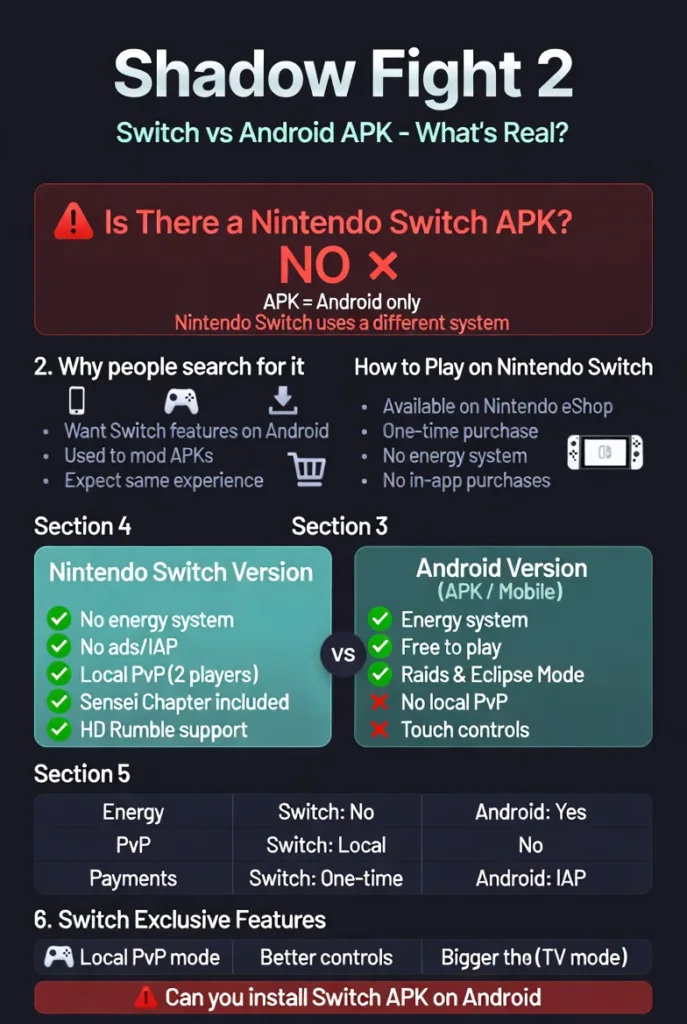
Is There an Official Shadow Fight 2 Nintendo Switch APK?
No. There is no official Shadow Fight 2 Nintendo Switch APK.
An APK is an Android application file. Nintendo Switch runs on a completely different operating system. The two are not compatible. Any website claiming to offer a “Shadow Fight 2 Switch APK download” is either misleading or offering something that does not work as described.
Shadow Fight 2 does exist on Nintendo Switch as a proper game. But it is a Switch game — not an APK, and not designed to run on Android without emulation software.
Why People Search for Shadow Fight 2 Switch APK
The search makes sense when you understand the context. Many players already use modded APKs on Android to access extra content. When they hear that the Switch version has exclusive features — like a local PvP mode and no energy system — they naturally want the same experience on their phone.
The term “Switch APK” comes from this desire. Players want the Switch version’s content delivered in a familiar Android format. Unfortunately, that is not how it works technically.
What you can do instead is covered in the sections below.
Official Way to Get Shadow Fight 2 on Nintendo Switch
Purchasing from Nintendo eShop
The only legitimate way to play Shadow Fight 2 on Nintendo Switch is through the Nintendo eShop. The game is listed there as a paid title. You purchase it once and own it fully — no subscriptions, no energy systems, no in-app purchase pressure.
To buy it, you need a Nintendo account, a Switch console, and a valid payment method. The process is straightforward through the eShop interface.
Price, Release Date, and Availability
Shadow Fight 2 launched on Nintendo Switch in 2022. The pricing sits in the budget-to-mid range for Switch titles, making it one of the more affordable games on the platform. Pricing may vary slightly by region.
The game is available in most major markets through the eShop. Some regions may have limited availability depending on local distribution agreements.
Key Features of Shadow Fight 2 Nintendo Switch Edition
The Switch edition is not just a port. Nekki made specific changes and additions that make it a meaningfully different experience from the mobile version.
Local Sparring Mode (PvP)
This is one of the most talked-about additions. The Switch version includes a local two-player sparring mode. Two players can connect Joy-Cons or controllers and fight each other directly. This feature does not exist in the standard Android version of the game.
For fans who have always wanted to test their skills against a friend in person, this mode alone makes the Switch edition worth considering.
Rebalanced Campaign and Sensei Chapter
The Switch version includes the Sensei Chapter, which was previously part of the special edition content. The campaign has also been rebalanced for a more consistent difficulty curve. Boss fights feel fairer, and progression through the story is smoother than in earlier mobile versions.
Switch-Specific Enhancements (HD Rumble, Controls)
The game supports HD Rumble on the Switch. This means the controller vibrates in response to impacts during combat, adding a physical dimension to each fight. The controls have been adapted for physical buttons, which many players find more precise than touch screen inputs.
Playing on a TV in docked mode also gives you a much larger view of the combat, which helps with reading enemy movements.
Differences from Android and Mobile Versions
| Feature | Nintendo Switch | Android (Standard) |
|---|---|---|
| Energy System | None | Yes |
| In-App Purchases | None | Yes |
| Local PvP Mode | Yes | No |
| Sensei Chapter | Included | Separate/Special Edition |
| Controls | Physical buttons | Touch screen |
| HD Rumble | Yes | No |
| Raids / Eclipse Mode | No | Yes |
| Price Model | One-time purchase | Free with IAPs |
No Energy System or In-App Purchase Issues
This is where the Switch version clearly wins over the standard Android release. On mobile, energy limits how long you can play in a single session. Running out means waiting or paying. On Switch, there are no such restrictions. You play as long as you want without interruption.
There are also no in-app purchases. Everything in the game is available through normal play. This changes the experience significantly. Progression feels earned rather than gated.
Added Content and Missing Features
The Switch version gains the Sensei Chapter and local PvP. It also benefits from a one-time payment model with no monetisation friction.
However, it is missing some content found in the mobile version. Raids and Eclipse mode are not available on Switch. These were multiplayer-focused additions to the Android game that did not transfer to the console version.
Native vs Emulated Experience
Playing the Switch version natively on a Switch console gives you the full, intended experience. Emulating it on Android or PC introduces variables like performance drops, compatibility issues, and the need for additional files and configuration.
For the cleanest experience, native play on Switch hardware is always preferable.
How to Play Shadow Fight 2 Nintendo Switch Version on Android (Emulation Guide)
This is technically possible but comes with important caveats. Emulating Switch games on Android requires specific software, files, and a reasonably powerful device. It is not a simple process.
Using Skyline or Yuzu Emulator for Switch Dumps
Skyline was a Nintendo Switch emulator built for Android. Development has since stopped, but builds are still available online. Yuzu was a popular Switch emulator for PC. Both were capable of running some Switch titles with varying levels of compatibility.
Shadow Fight 2 on Switch may or may not run correctly depending on the emulator version and your device specifications.
Required Files (NSP/XCI, Prod.keys, Firmware)
To run a Switch game through emulation you typically need:
- A game dump in NSP or XCI format
- Prod.keys file (console-specific encryption keys)
- Switch firmware files
- A compatible emulator installed on your device
Each of these components must be sourced correctly. Prod.keys must come from a real Switch console. Using files sourced from other means raises legal questions depending on your country’s laws around game backups and emulation.
Step-by-Step Installation Tutorial
Setting up Switch emulation on Android is a multi-step process:
- Install a compatible Switch emulator on your Android device
- Place your prod.keys file in the correct emulator directory
- Install the Switch firmware through the emulator settings
- Load your NSP or XCI game file through the emulator’s game browser
- Configure controls and graphics settings for your device
- Launch the game and test performance
Performance will vary significantly depending on your device. Higher-end Android phones with strong processors handle emulation better. Budget devices may struggle with frame rate and stability.
Shadow Fight 2 Nintendo Switch Modded APK Claims
What Mod Sites Offer (Unlimited Money, Unlocked Features)
Some websites claim to offer a modded APK version of Shadow Fight 2 that replicates Switch edition features. These typically advertise unlimited coins, all weapons unlocked, no energy limits, or the Sensei Chapter unlocked.
These files are not actual Switch game files. They are modified versions of the standard Android APK with edited game values. The Switch branding is used to attract search traffic.
Risks of Downloading Fake or Modded Switch APKs
Downloading APK files from unofficial sources always carries risks. These include:
- Malware or spyware embedded in the file
- Account bans if the game detects modified files
- Broken or incomplete game content
- No updates or support after installation
A file claiming to be a “Shadow Fight 2 Switch APK” cannot be genuine. The Switch game format is incompatible with Android by default. Any such file is either a repackaged standard APK or something else entirely.
Legitimacy and Safety Concerns
From a legal standpoint, distributing or downloading game files you do not own a licence for sits in a grey area in most countries. Emulating a game you legally own is generally more defensible than downloading it from a third-party site.
If you want modified Android gameplay, there are safer and more transparent options available from established modding communities with clear documentation.
Alternatives to Shadow Fight 2 Nintendo Switch APK
Official Android APK (Shadow Fight 2 Latest Version)
The standard Android version of Shadow Fight 2 remains one of the best offline fighting games available. It is free to download from the Google Play Store. While it includes an energy system and in-app purchases, the core gameplay is identical to the Switch version.
For players who want to explore the full depth of the combat system — including enchantments and gear upgrades — this enchantment guide for Shadow Fight 2 covers the system in detail and helps you get the most from your weapons.
Shadow Fight 2 Special Edition on Mobile
The Special Edition is a paid Android version that removes the energy system and includes the Sensei Chapter. It is the closest mobile equivalent to the Switch experience.
If you want the Switch-style gameplay without buying a Switch console, the Special Edition is the most practical option. You can find out more about the Shadow Fight 2 Special Edition mod APK and what it offers compared to the standard release.
Other Platforms (PC Emulation or Definitive Edition Mods)
Shadow Fight 2 can also be played on PC through Android emulators like BlueStacks or LDPlayer. These offer mouse and keyboard controls, which some players prefer for precision. The experience is similar to mobile but on a larger screen.
PC-based Switch emulation through Yuzu or Ryujinx gives access to the actual Switch version with better performance than mobile emulation, provided you have a capable computer.
Pros and Cons of Emulating or Modding Shadow Fight 2 Switch
Benefits (Free Access, Portable Play)
Emulation allows you to experience the Switch version without buying a console. If you already own the Switch game legally, emulating it on another device is a way to enjoy it on different hardware. Mobile emulation also means portable play without carrying a Switch.
Modded Android APKs remove energy restrictions and unlock content, which significantly changes how the game feels — particularly for players who want to focus on combat rather than resource management.
For players curious about competitive weapon choices in the game, this comparison of Avenger vs Rock in Shadow Fight 2 is a useful read before investing upgrade resources.
Drawbacks (Legal Issues, Performance, Bans)
Emulation sits in a legally complex space. Downloading game files you do not own is generally not permitted under most software licences. Performance on mobile emulators is inconsistent, and many players report crashes or graphical issues.
Modded APKs from unknown sources carry security risks. They may also break game balance in ways that reduce long-term enjoyment. Once content is unlocked without effort, the progression system loses its appeal.
Conclusion: Best Way to Enjoy Shadow Fight 2 on Switch
There is no Shadow Fight 2 Nintendo Switch APK. The Switch version is a standalone console game, not an Android application. The two formats are incompatible by nature.
If you want the Switch edition’s features — no energy system, local PvP, physical controls — the only reliable way is to buy it from the Nintendo eShop.
If you want a similar experience on Android, the Special Edition is your best option. It removes the energy system and includes the Sensei Chapter, making it the closest mobile equivalent to the Switch version.
For players who want to master the game regardless of platform, understanding the combat mechanics matters more than which version you play. Learning how to defeat Titan in Shadow Fight 2 is a good place to start — Titan is the game’s hardest boss and a true test of everything the combat system offers.
The Switch version is worth experiencing if you have the hardware. For everyone else, the Android Special Edition delivers most of the same value without the console requirement.
FAQs
Is there a Shadow Fight 2 Switch APK?
No. Shadow Fight 2 on Switch is a console game. It is not an APK and cannot run on Android natively.
Can I play the Switch version on Android?
Only through emulation, which requires specific files, software, and a capable device. Performance varies.
Does the Switch version have an energy system?
No. The Switch edition has no energy limits. You can play without interruption or in-app purchases.
What is different about Shadow Fight 2 on Switch?
It includes local PvP, the Sensei Chapter, HD Rumble support, and physical button controls with no energy system.
Is Shadow Fight 2 Special Edition the same as Switch?
Very similar. Both remove the energy system and include the Sensei Chapter, but the Switch version adds local PvP and controller support.
About The Author
